
WordPress to Magento Complete Migration Guide
There comes a moment when every scaling ecommerce brand takes a hit. The sales are going up, the product catalog is growing, and then, out of nowhere, your site starts lagging during a flash sale. A plugin update breaks checkout. And for the third time in a month, your developer tells you that WooCommerce wasn't really designed for this.
That moment is your sign.
Not a sign to panic. A sign to migrate.
Magento isn't the flashiest name in the room, but it's the one that enterprise brands quietly rely on when the stakes are too high to mess around. This guide will walk you through exactly how to make the move without losing your data, your rankings, and MOST IMPORTANTLY, your mind.
What You're Actually Leaving Behind
Let's not drag WordPress. It gave a lot of businesses their start, and WooCommerce is genuinely good; until it isn't. WooCommerce still leads the global market, powering between 22% and 25% of all online stores, and for small and mid‑sized shops, that's exactly right. The trouble starts when you outgrow the bracket it was built for.
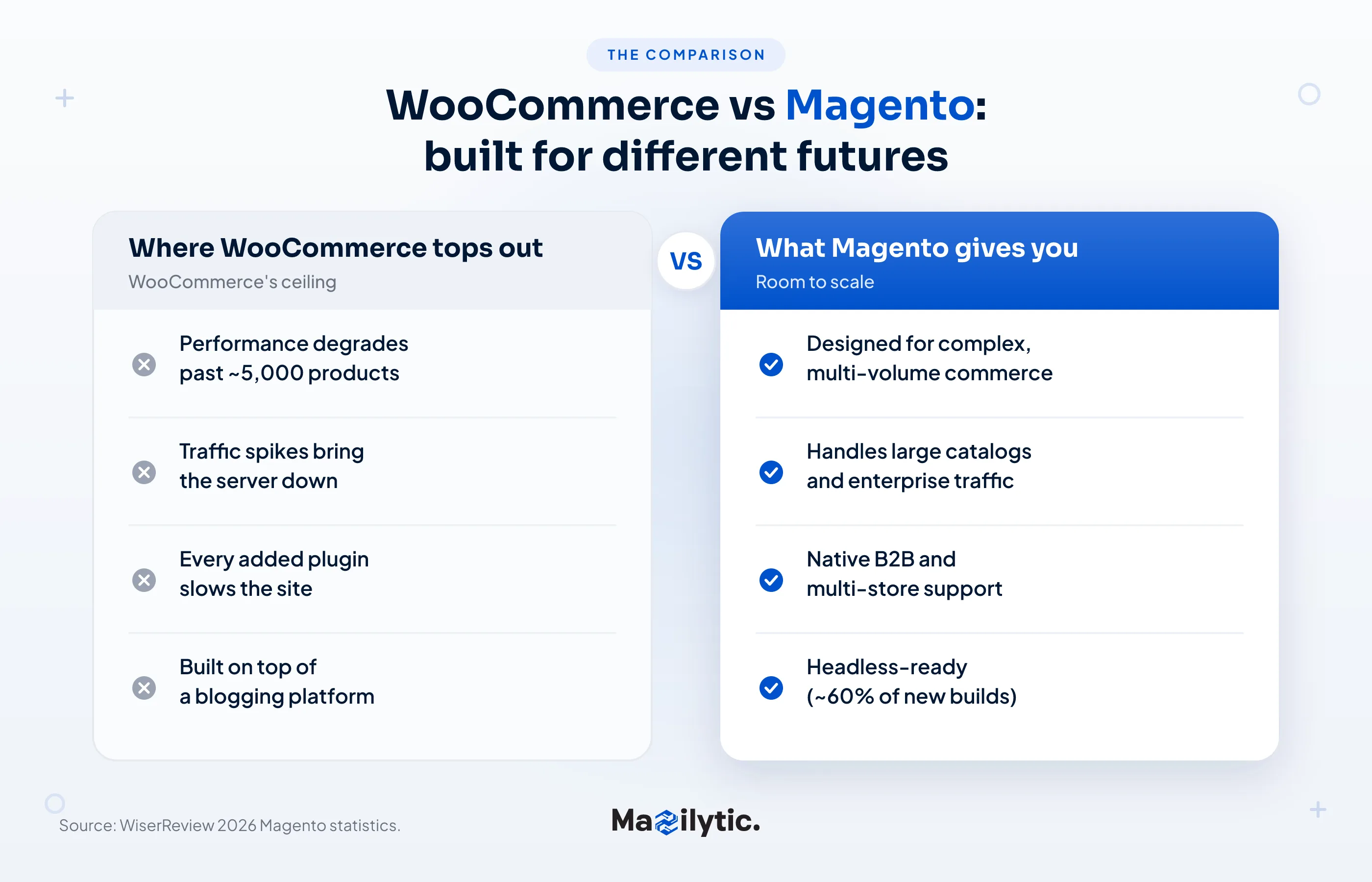
The cracks tend to show up in the same places every time: a catalog pushing past 5,000 products, traffic spikes that bring the server to its knees, a growing list of plugins that each slow the site down a little more. None of it is catastrophic on its own. Together, it becomes a ceiling.
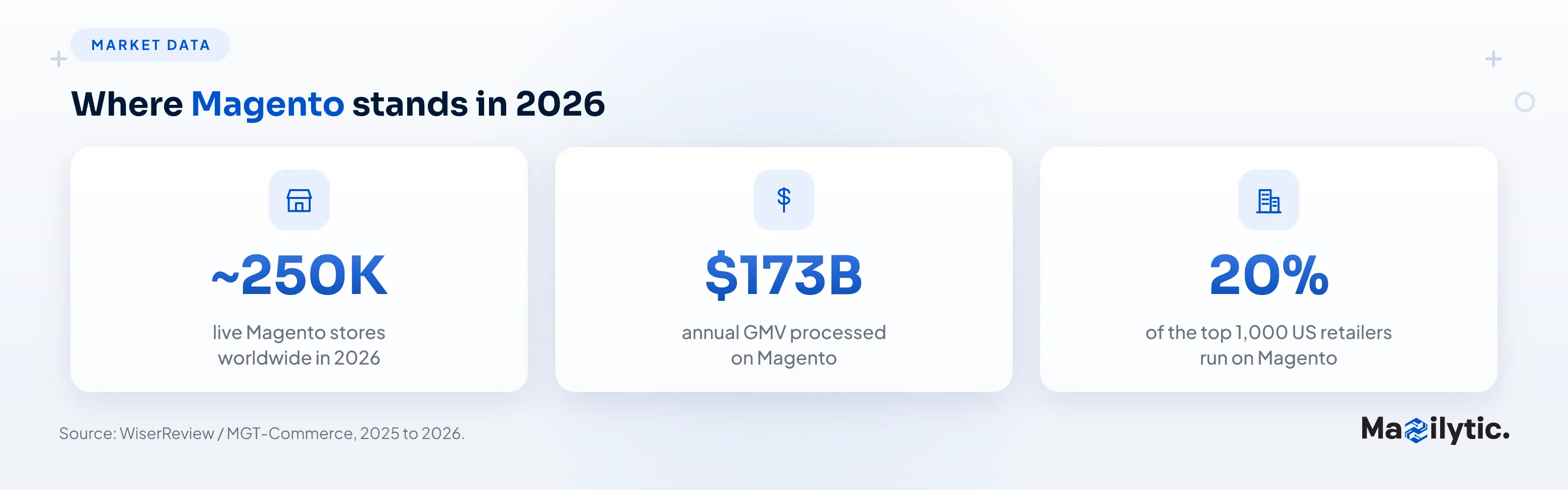
Magento doesn't carry that limitation. It was designed for complex, multi‑volume commerce from the ground up, not built on top of a blogging platform. That architectural difference is the whole reason it holds roughly 8% of the global ecommerce market while anchoring the enterprise tier: around 20% of the top 1,000 US retailers run on it, and it ranks among the top three ecommerce platforms worldwide.
- ~250K - Live Magento stores worldwide in 2026
- $173B - Annual GMV processed on Magento (2025–26)
- 20% - Of the top 1,000 US retailers run on Magento
Where WooCommerce Tops Out
- Catalog ceiling: Performance degrades as you push past ~5,000 products.
- Traffic spikes: Flash sales and surges can bring the server to its knees.
- Plugin bloat: Each added plugin slows the site a little more.
- Foundation: WooCommerce is built on top of a blogging platform.
What Magento Gives You
- Built for volume: Designed for complex, multi‑volume commerce from the ground up.
- True scalability: Handles large catalogs and high‑traffic enterprise loads.
- Native B2B & multi‑store: Multiple store views, currencies, and customer groups built in.
- Headless‑ready: ~60% of new Magento builds now use headless architecture.
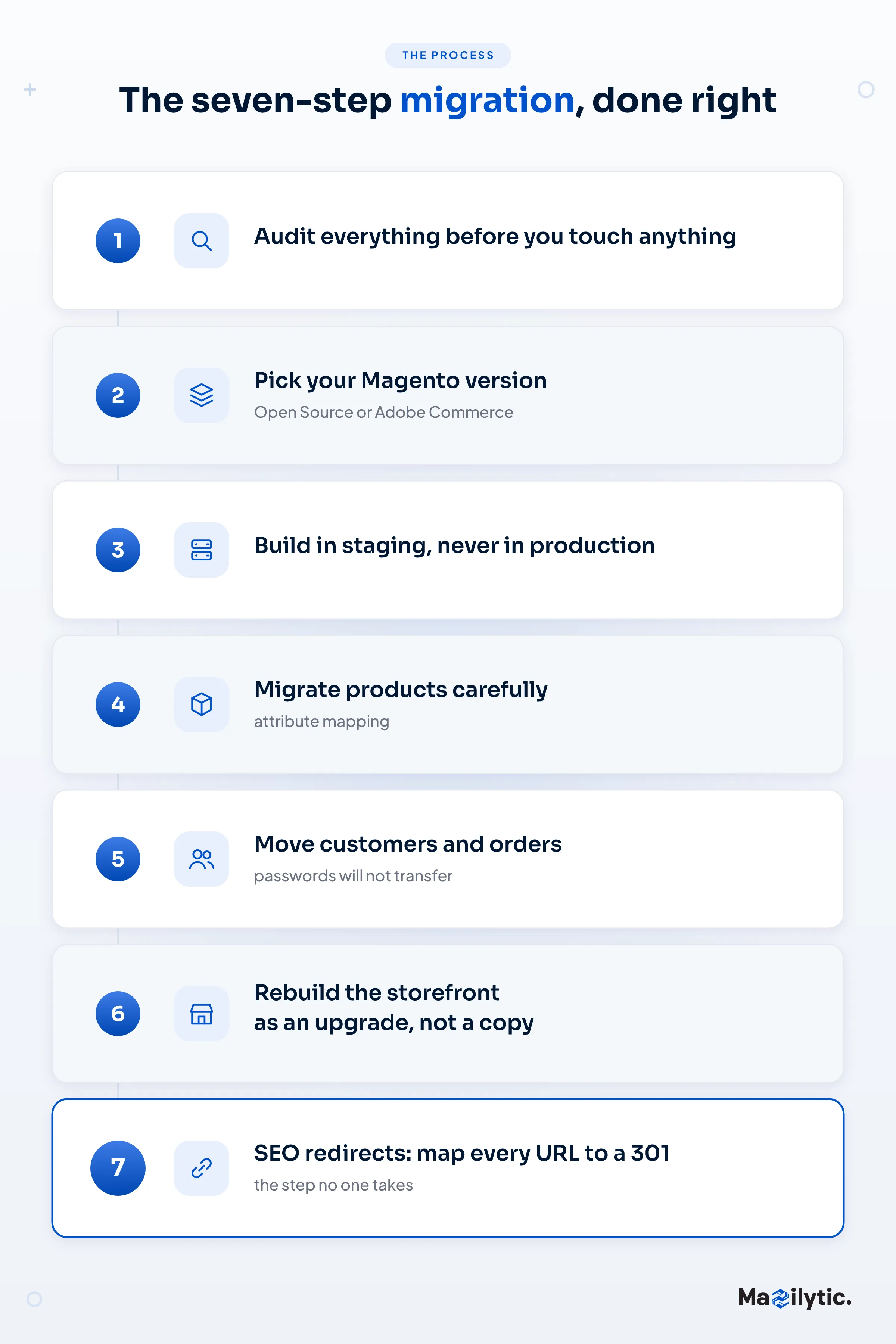
The Seven‑Step Migration, Done Right
A migration isn't a single event but a sequence, and the order matters. Skip a step or rush it, and the cost shows up weeks later. Here's the process we'd walk any client through, in the order we'd do it.
Step One: Audit Before You Touch Anything
Most companies rush into migration, and that's exactly how they lose product data, break URLs, and tank their SEO overnight. First, document everything in your WooCommerce store:
Every product. Every variant. Every customer record. Your category tree. Your existing URLs (especially those). All of your discount codes, tax settings, shipping zones, and active integrations.
This audit becomes your checklist, your safety net, and your sanity check as you go through the whole process.
Step Two: Pick Your Version of Magento
Two paths: Magento Open Source or Adobe Commerce.
Open Source covers the needs of most growing stores; it's powerful, flexible, and free at its core. Adobe Commerce layers on B2B functionality, cloud infrastructure, and enterprise support. If you're running complex wholesale operations or need Adobe's managed hosting, that's your route. Otherwise, Open Source gets the job done.
Decide this early. Switching lanes mid‑migration is its own kind of nightmare.
Step Three: Build in Staging, Not Production
Build your new Magento environment on a staging server. Set up your base information like currency, tax, shipping rules, and store views before importing a single product. You want the skeleton solid before you start moving furniture in. And before you change anything, take a complete, verified backup of your existing store. That backup is your recovery plan if something goes sideways.
Step Four: Migrate Your Products (Carefully)
Products are where migrations most often go wrong. For larger catalogs, tools like LitExtension or Cart2Cart can do the heavy lifting. Smaller stores can handle CSV imports directly.
The one thing that most people find confusing is attribute mapping. WooCommerce and Magento have different ways of storing product data. Take the time to configure your current attributes correctly to the Magento attribute sets, or you'll be spending twice the time cleaning up the mess later on.
Images need explicit handling too; they don't migrate automatically with the data. Map them deliberately.
Step Five: Customers and Orders
Passwords won't transfer. The encryption is incompatible. Set up a "reset your password" email flow triggered on first login post‑migration. It's a minor friction point that handles itself gracefully if you plan for it.
Order history, on the other hand, absolutely should come over. Your support team needs it. Your customers expect it when they call in.
Step Six: Rebuild Your Storefront
Don’t try to re‑create your old design exactly. Magento’s theming system differs from WordPress, and fighting it is a losing battle. Use the migration as a forcing function to modernize and buy a solid Magento theme or have one built. Approach it as a deliberate upgrade, not a copy job.
Step Seven: SEO Redirects, the Step No One Takes
This is the step that separates clean migrations from disasters. Export every single URL from your WooCommerce store. Set up 301 redirects in Magento for each one. Preserve your meta titles and descriptions. Submit your new sitemap to Google Search Console on launch day.
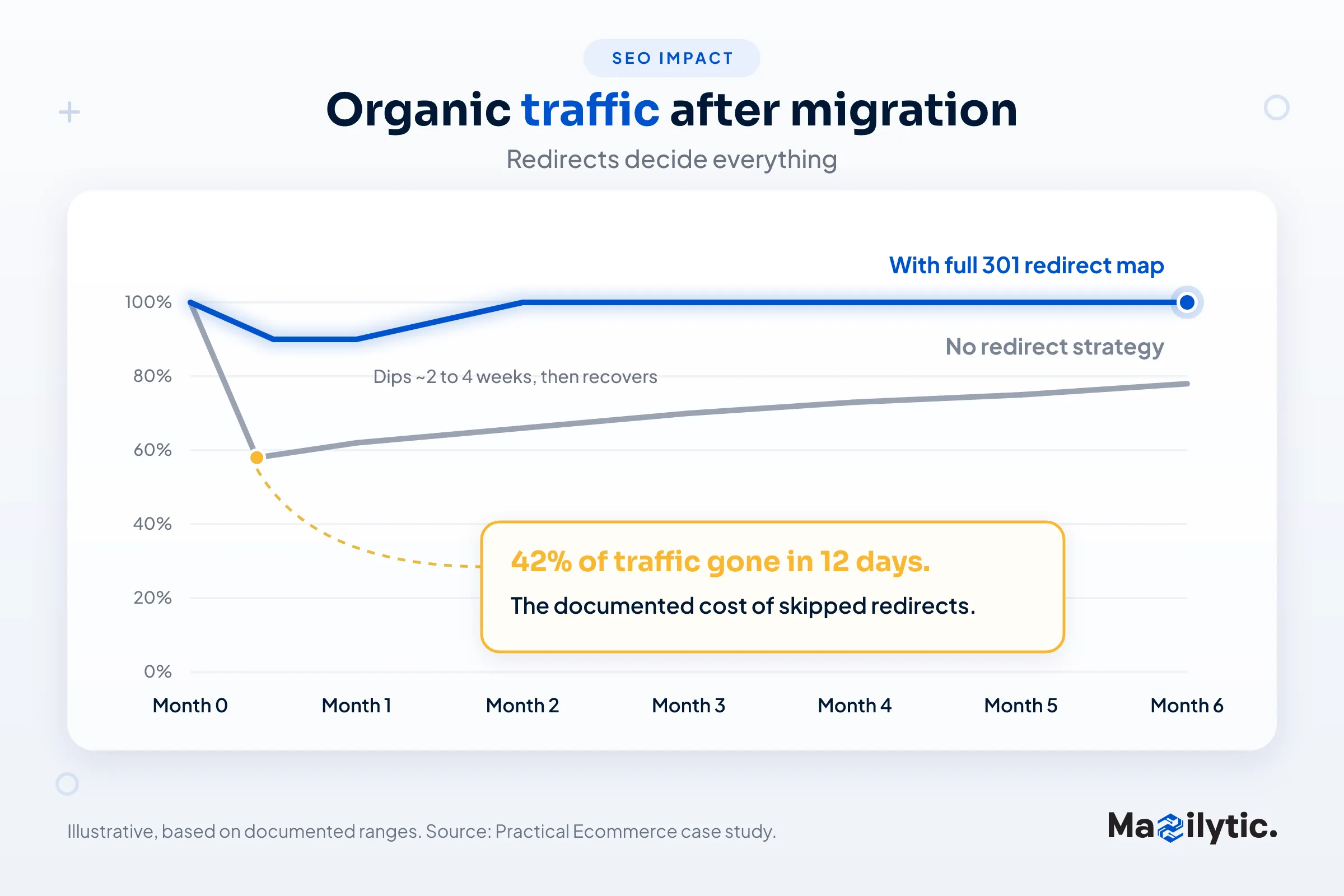
Here's why we won't let a client skip it. A poorly managed migration can cost 20 to 50% of organic traffic, and recovery takes months. In one documented case, a brand that declined a redirect strategy saw a 42% drop in organic traffic within 12 days of launch. Skipping redirects doesn't hurt you immediately; it hurts you three months later when you're wondering where your organic traffic quietly went. Done properly, with a complete one‑to‑one redirect map, most well‑managed migrations see fluctuation for two to four weeks and recover to pre‑migration levels by month two or three.
Ecommerce Fastlane, 2025"A single missed 301 on your top‑traffic page can hand years of hard‑won ranking authority straight to a competitor." (Ecommerce Fastlane, 2025)
Test Then Launch
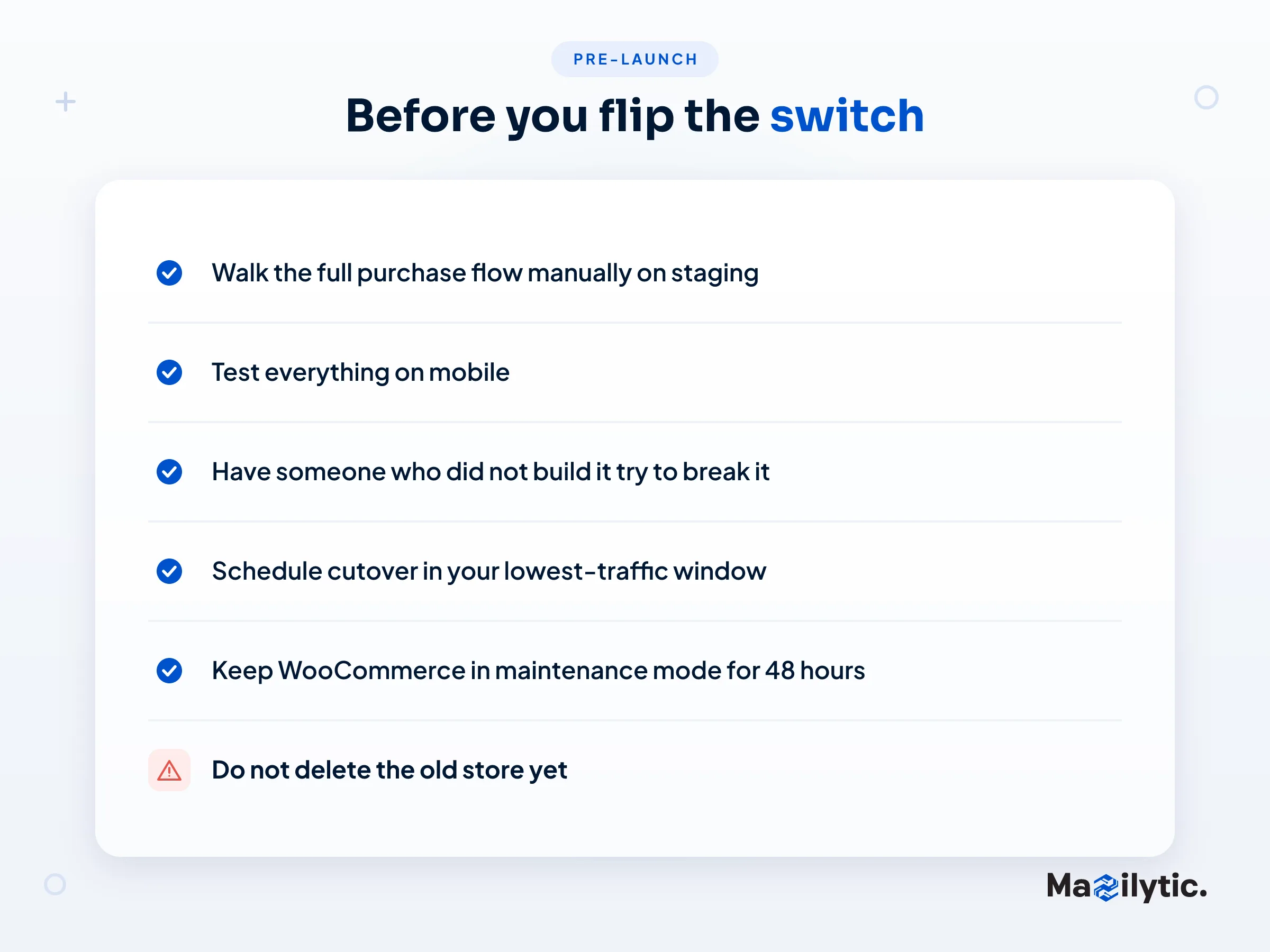
Walk through your entire purchase flow manually on staging. Test on mobile too. Bring in someone who didn't build it and watch them navigate; they'll be able to find the things you've gone blind to.
Schedule your cutover in your lowest traffic window. Put your WooCommerce store in maintenance mode for 48 hours after going live. Don't delete it yet.
The Conclusion
A migration done right doesn't just move your store, but it transforms. Better performance, real scalability, and a platform that won't become a hindrance the next time you have a big month.
At Mazilytic, this is exactly what we do. If you want a team that has years of expertise in this and knows where the landmines are, then reach out.
Frequently Asked Questions
Q1: Will I lose my Google rankings when I migrate?
Only if the migration is handled badly. Skip the planning and the comprehensive 301 redirect map and you can expect a 20 to 50% loss of organic traffic. Done correctly, with a complete redirect map, preserved metadata, and close post‑launch monitoring, you should see only short‑term fluctuation, with traffic recovering to pre‑migration levels in 2 to 3 months. The horror stories almost always trace back to missed or lazy redirects, not to Magento itself.
Q2: Should I choose Magento Open Source or Adobe Commerce?
If you run complex wholesale operations, need native B2B capabilities, or want Adobe's managed cloud hosting and enterprise support, Adobe Commerce is built for you; it targets businesses doing $5M+ in revenue. Magento Open Source is powerful, flexible, and free at its core, and it gets the job done for most growing stores. Decide before you begin; changing editions mid‑migration is a painful process.
Q3: Do my customers' passwords transfer over?
No. WooCommerce passwords can't be converted to Magento directly because the two platforms encrypt them incompatibly. The clean solution is a reset‑your‑password flow triggered on each customer's first login after launch. Order history, though, can and should transfer; your support team and your customers will expect it.
Q4: Is Magento overkill for my store?
It can be. Magento earns its keep when you have real scale: big catalogs (5,000+ products), heavy traffic, complex B2B or multi‑store setups, and plugin bloat that has become a performance bottleneck. If you're a small business doing well on WooCommerce, migrating now would add cost and complexity you don't need yet. Move when WooCommerce actually starts holding you back, not before.
Q5: What's the most common mistake during migration?
Two, and they're related: skipping the 301 redirect map and rushing the attribute mapping. Missed redirects quietly bleed organic traffic week after week after launch, and attribute errors create data‑cleanup work that can double your timeline. Both are completely avoidable, which is why the first steps in this guide matter as much as the migration itself.